
Make absolutely free calls from iPod Touch

I get a lot of readers asking me, “How can I make free calls from my iPod Touch?” Well, the answer is much simpler than you may think. It involves only 4 major steps and in fact, it takes maybe a whole 15 minutes out of your day to do this. After that, you are free to make and receive calls from an actual phone number as well as text and receive texts.
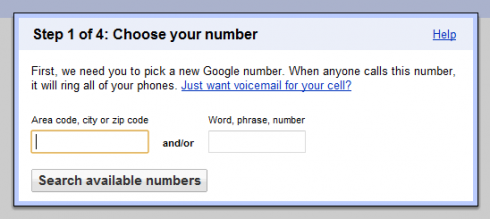


First off, you head over to Google Voice and get a number. (If you don’t already have a GMail account, you will have to make one). Once you are signed in, you can pick a free number by just choosing a random one, or by searching for digits that you want to appear in your number. Once your number is picked, voila, you are a quarter of the way done.
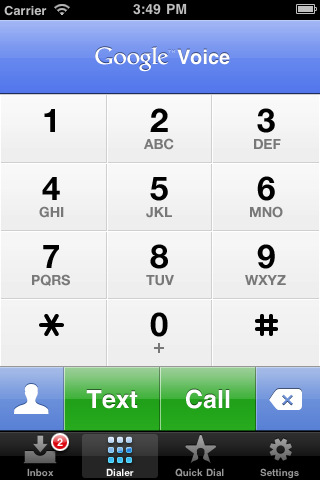
Google Voice

Next, you have to download the first key component in making this all happen. Download Google Voice from the App Store. (Don’t worry, it is a free app). Then, enter the account information for the Google Voice number you just made. Now you are set to text your friends and receive text messages back for free. All that is needed is WiFi, and if you are on an iPhone you can use your data. This is a great alternative to paying for an unlimited texting plan. Plus, with Google Voice’s push notification, it is just like the native texting on the iPhone. If you want, you can just stop here and enjoy your free texting, but I think most of you are going to want to read on.

Google Voice is not a VoIP service; therefore, you have to have an actual phone to call. Think of it as an operator. However, there is a way around this. Whistle Phone is a free app that you can download from the App Store. It also gives you a number, but when you want to make a call, there is a short ad before it connects you. Here is the cool part. If you use Google Voice to call, it will call your Whistle Phone account and then call the number you want to call. This tricks Whistle into thinking it is being called so there is no ad. Pretty sweet huh? So just download whistle and create an account; that will give you a second number. You are almost done!
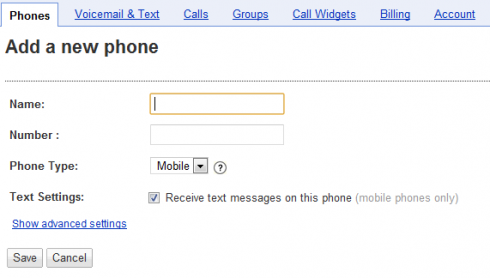
The last step is configuring your Google Voice to ring your Whistle Phone. This part has to be done on a computer, or in the full web version of Google.com/voice. Under Settings>>Voice Settings>>Phones>>Forwards to, you will see “Add another phone.” Just enter your Whistle number and you are done. You are now free to call anyone. Google Voice also has a cool visual voicemail feature so that will transcribe the audio into text for when you do miss a phone call.

That’s it. Happy calling!

*This only works if you have a microphone, 4th Gen iPod Touch or iPhone.

Update: You must press 1 when answering to accept an incoming call. Alternatively, you can press 2 to send to voice mail. If you do nothing, the call will automatically go to voice mail after a short while.

Tags: , , , , ,

Post comment as twitter logo facebook logo
Sort: Newest | Oldest
IsabelBallardo 5 pts

hey i want seves on my ipod and i dont know how to do the steps

petetwilson5 5 pts

Is Whistle Phone still free? Today is 2/26/13. I think this webpage is a couple years old. I am looking for a way to make cheap/free calls from my ipod touch. I just went to the whistle phone sight, and it looks like they are charging. It appears that you get 20 minutes free, but then you have to upgrade which costs $. Someone please help!! I am not good with this computer stuff. Thanks.

sandraignaz 5 pts

I Have I Pod touch Genereaton 4 and app sore says me I cant download Whatzapp ?? o.O cant understand it so why can I choose Viber ?? its the same to Whatz app and by the way I typed in side but the Real name of it is IGVOICE and costs on german appstore 4,49€ 


I mean how to call from my Contactlust on my Ipod??? I think you can call with IPodTouch Geneeration 4+ you only need to recive a SMS on your mobiöe phone to verifi it. and than you can call and sent free sms also I wanna use my I Pod in PFFLINE MOODE in school etc??

use talkatone it is a add-on to google voice app that dosent make it where u have to add another number  http://www.talkatone.com/gettingstarted.html#1

jbuffyc 5 pts

oh my gosh i can't believe it worked!!!! but just make sure you activate it from the email whistle phone sends you before activating it on google voice Luv it thanx!!!

Raheela 5 pts

I need help i got google voice but the reason is i got ipod touch 4th gen an i wnt to cal my mom and she has a htc does she need a goolge voice to connect my call or can i jus call her

Does iPod touch let u call for free

TalkaTone works way better and you dont need a cell phone number to make or receive calls. Although I have a cell number, when my phone was disconnected for a short while, I could make and receive calls using talkatone with my google voice number.

You do not need a cellphone number here either. Just a google voice number.

cool. i think that this is a good thing for ipod touch. Do you have to have wifi to do whistle phone calling?

Yea, Wi-Fi is necessary.

I've followed your instruction BUT after adding whistle phone - it requires you to type in 2 words but each time i type it in ...it doesn't take when i know it is correct....PLEASE Help me

in whistle select nuber processing is taking for ever   any tips?

Hi, Will this work in France too? I am living in France and I'd very much like to use my iPod Touch as a Webphone when I am not at home (mobile telephony is very expensive in France).

Also, google voice IS a VoIP service. You log into gmail and you can make free calls from your computer. But the google voice app wants a real number. Talkatone bypasses this.

Just get talkatone Then you DON'T need an actual phone to call.

Well what program do u use to actually answer the calls? And wht app do I use to call? Whistle or google

since whistle has a 20 minute time limit what happens when you go over that time limit? does it start to charge more?

No, I haven't reached the 20 min limit, but I think it just cuts the call short. Then you can redial.

does whistle charge when you call people or is it just a free app that just calls people for free when you download the google voice into it

It's is a free app. Usually it plays an ad before dialing out, but google voice calls the person you want AND calls you so there is no ad.

IM SCARED! [Copied from whistlephone.com] On April 13th, 2011, we're capping the length of inbound and outbound calls for our free users at 20 minutes. This is a per call limit only. Do you know any substitutes to whistle? Is there a way you could walk us through a tutorial with sipgate and something like Fring or Nimbuzz? Regards, Joe

Well, like I said before, 20 min is a long time to talk for. You can also use Nimbuzz, I did not get push notifications when the app was closed (not open in multitasking bar either). Also, Nimbuzz is not a provider, just a "vehicle" to use say whistle or another VoIP service.

How do you turn off Click2Call? ( for Ipod 4)

go to the google voice app >>SETTINGS>>Click2Call [there will be an on-off switch, just switch off

ok so i did everything but i cant call out! i pressed 1 and all but all I can do is call the number I have set during the setup thingy, what do i do?

Thanks Bryce ! Really appreciate it.

Okay so I looked around. The thing is, there aren't any VoIP providers offering calls for free (that I know of). If you could find any provider that offers free inbound calls let me know and I could walk it through with Nimbuzz or the like. Also, why do you need more than 20minutes? Just wondering because I never talk that long anyways. Just recall them :) Thanks, B

I believe you could use the SIPgate VoIP service [which offers free and unlimited incoming calls, which is key] with an SIP client app like fring or nimbuzz. hope this helps

This is great info and I've loved using gv +whistle, worked great. But just got an email from whistle that starting apr 6 they are capping free inbound and outbound calls to 20 min! Can you run through the alternatives of gizmo5 and talkative in detail? I'm willing to buy the apps if needed but don't wantvto pay annongoing fee. Thanks in advance!

Well, gizmo 5 was bought by Google a while back and now it seems that they are terminating the service. I will look around for alternatives and try to get back tou you. Thanks, B

Every time I enter my whistle phone number on google voice it says this is an invalid number

Then try signing out and back of google voice, or make sure the whistle application on your iPod Touch is up and running, because google will need to make a verification call to it to make sure it is a valid number.

Then I got nothin'. Try deleting Whistle and creating a new account. That's all I got. Works for me XD.

Here is what it is supposed to look like when it works. You will see someone placing a call using the above tutorial. [I wonder what Apple is going to think when they find out XD] anway, enjoy: http://www.youtube.com/watch?v=TmQj1-0Ql5s&feature=player_detailpage#t=82s

I got a Whistle account and tried adding it to GV. It says that this number is already added to two GV accounts so I can not use it. I just tried it once so I don't know why that would happen. I deleted the app and tried again with a different email and it says there was a problem and to contact Whistle. Any ideas? Has anyone else had this problem?

Ok not sure what the problem was. I opened a new account on my iPhone and just entered the info on my Touch. Can you please tell me what type of microphone is needed to make calls? I thought I could use a Bluetooth but have found out you can not. Is it a headset? Where would I find one? Thanks so much!!

Sorry. I still need help. I got a headset. My husband had one. When google voice calls to verify, the phone will ring but when I pick up, nothing happens. Also, when I place a call it just rings once on the ear piece but then I can not hear anything else on either line. Please help.

I had a similar situation. I just went ahead and punched in the verification code anyways. After that I tried to make a call and the call went through as described.

Hmmm...Well now I seem to have gotten Gizmo to authenticate, but it won't appear in the list of numbers to call...maybe I'm missing something, but Whistle number appears as does my mobile number..I assume this just happens as the iTouch gets info from the google voice online...but why no Gizmo available as an option...is there a way to set that up on the iTouch....I put a notice ticket out on Gizma support, but am not hopeful as others have not been satisfied...think I'll next ask for my $2 back:)

Hey Bryce, Well I had this working on my iTouch, but then for some reason (and there are a number of comments on google discussion about it) gizmo will not authenticate and as a result the gizmo app for iTouch won't show the number to call out through, although it will accept incoming calls...Well see if my $2 investment was a waste. Some folks say they have gotten it to authenticate, but some like me have not. So I tried your Whistle suggestion, got it to work, but one little glitch, I bought a very cheap microphone, and unless i'm missing something, there doesn't appear to be a speaker phone option, correct?...So I'll have to get a mic/earphone like a headset combo to make this work I guess...Still hoping for gizmo to bounce back....any other softphones you know that may have a speakerphone option to click...thanks again for all...Rick

Calling out works , When I get a call coming in I press answer then whistle comes up I press 1 but it doesnt pick up the call. I used my work phone to call my ipod I press 1 and the line I'm calling from stays ringing. Any help

Hi. Just a shot in the dark, but I had a similar thing. It seems to me that the first tap on the Whistle keypad either does not work, or has to be made firmly. If the key is actually depressed, you will see it change color (mine goes blue). If you "accept the call" then hit "1" and it does not light up blue, hit it again... hope this works for you.

Yes, for sure. I was checking the Whistle Support page, and another person was having exactly the same problem. Advice from their support will be pasted below; however i followed this advice and never got the prompt regarding Enable push." Will keep trying! Thanks: From Whistle Support: Are you certain that you enabled Push Notifications? Would you please run through this checklist to be sure? 1. Hold down the sleep button until the “slide to power off” message appears. Use the slider to power off the device. 2. Restart the device. 3. Start Whistle and let it run for 10-15 seconds. If asked to allow Push Notifications, click OK. 4. Exit Whistle. 5. Go to the Settings application, and click on Notifications. Confirm that Whistle has Sounds and Alerts enabled. 6. Place a test call from a landline or cell phone to your Whistle number.

Okay...well I have one more thing to try. Go to main iPod settings>>scroll down to whistle>> what are the settings in there? What is the proxy, and do you have both sliders on "On"? I really want to help you with this so just bare with me :)

Bryce, thank you so much. Unfortunately, I followed your suggestion and both Whistle Settings sliders indicate ON. I turned them off, then back on for good measure. Last night I also power-offed the IPod, thinking magically something overnight may cure itself. I will plug away a bit more today. Meanwhile I installed Pinger and it seems to be working fine for OUTGOING calls. Thanks/// David, Portland Or.

AH-Ha! Think I found the problem. Inbound calls to my GV are now routing through Whistle as they should. I discovered on the IPod Touch, "Settings, Sounds and Alerts, Whistle" both were marked OFF. I am 99.9999% sure that I did not choose this yesterday when I installed it. However, with Sounds and Alerts turned on, I can now make inbound calls to my GV. An added remark to anybody else following or having trouble.... when the call is made, the Ipod first rings and then has a message of "Call from Whistle, Answer or decline." When you select "Answer", it then takes you to the Whistle keypad, where you THEN need to enter the One Key to connect the call. So, answering takes two steps... I will update as anything good or bad happens as I now put this to test. This could save some big-money on cell carrier charges and if it continues to work was well worth the day of frustration. Thank you, again. /// David